 CodeMaster Academy
Framework vs Library: What's the Difference?
Introduction
If you've spent any time around developers, you've probably heard terms like "React is a library" and "Angular is a framework" thrown around casually, often without much explanation. For beginners, this distinction can feel confusing, especially since both frameworks and libraries seem to do similar things — they help you write code faster by providing pre-built functionality instead of building everything from scratch.
However, the difference between a framework and a library isn't just semantic — it reflects a fundamental difference in how much control you have over your code's structure and flow. Understanding this distinction will help you make better technology choices for your projects and will make conversations with other developers much easier to follow.
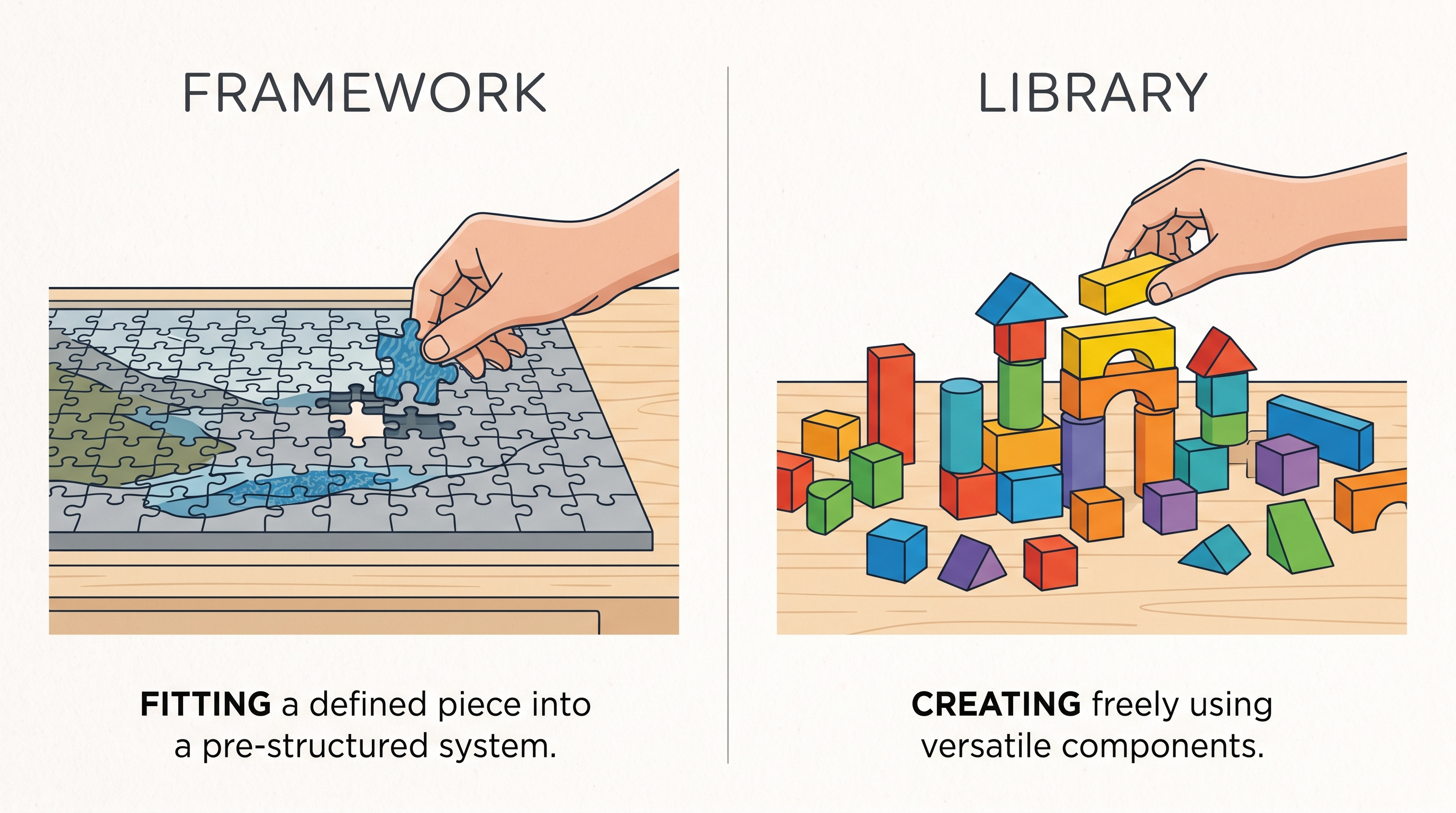
The simplest way to understand the difference is through a popular analogy: using a library is like hiring a contractor to build a specific part of your house, like the plumbing — you're still the architect, calling the shots on when and how it's used. Using a framework is like moving into a pre-built house — the structure is already there, and you must work within its walls, filling in your own furniture and decorations, but the overall foundation and flow are already decided for you.
In this article, we'll break down exactly what separates a framework from a library, using real, popular examples, so you can understand not just the definitions, but when and why you'd choose one over the other.
How to Use This Guide
- Read the core definitions section first to understand the fundamental distinction.
- Review the "Inversion of Control" concept, which is the real technical difference.
- Study the real-world examples to see popular frameworks and libraries in action.
- Check the comparison table for a quick, at-a-glance summary.
- Explore the decision-making section to understand when to choose each option.
- Try using a small library in a project, then try a small framework, to feel the difference.
- Revisit this guide whenever you're evaluating new tools for future projects.
What Is a Library?
A library is a collection of pre-written code that you can call upon whenever you need specific functionality, without giving up control over your application's overall structure. You decide when to use the library, how to use it, and where it fits into your existing code. You are always in charge — the library simply provides tools you can pick up and put down as needed.
For example, if you're building a JavaScript application and need to make animations easier, you might import a library specifically for that purpose, call its functions exactly where you need them, and continue writing the rest of your application however you see fit. The library never dictates your overall project structure — it simply assists with a specific task.
Popular examples of libraries include React (for building user interfaces), jQuery (for simplifying DOM manipulation), NumPy (for numerical computing in Python), and Axios (for making HTTP requests in JavaScript).
What Is a Framework?
A framework, on the other hand, provides a complete structural foundation for your application, and it expects you to build your code within its predefined rules and patterns. Instead of you calling the framework's functions when needed, the framework calls your code at specific points — this concept is known as "inversion of control," and it's the key technical difference separating frameworks from libraries.
When you use a framework, you're essentially agreeing to work within its established architecture. The framework often dictates how files should be organized, how different parts of your application should communicate, and what conventions you must follow. This can significantly speed up development for certain types of projects since many structural decisions are already made for you.
Popular examples of frameworks include Angular (for building web applications), Django (for building Python web applications), Spring (for building Java enterprise applications), and Ruby on Rails (for building web applications quickly with strong conventions).
Inversion of Control: The Real Difference
The concept of "inversion of control" is the clearest technical way to distinguish a framework from a library. With a library, you call the library's code — you are in control, deciding when and how each function gets used. With a framework, the framework calls your code — it controls the overall flow, and you fill in the specific pieces it expects at predetermined points.
Think of it this way: if you're using a library, you write the main program, and occasionally call the library to help with a task. If you're using a framework, the framework is essentially the main program, and it calls your custom code whenever it needs something specific from you, like handling a particular route or event.
This is why React is often called a library rather than a framework — even though it's used to build entire user interfaces, you still maintain significant control over your application's structure, choosing how to organize routing, state management, and other architectural decisions using additional tools of your choice.
Comparison Table
| Aspect | Library | Framework |
|---|---|---|
| Control | You control the flow, calling functions as needed | Framework controls the flow, calling your code |
| Flexibility | High flexibility, less structure enforced | Lower flexibility, more structure enforced |
| Learning curve | Generally easier, learn as you go | Steeper, must understand the framework's conventions first |
| Examples | React, jQuery, NumPy, Axios | Angular, Django, Spring, Ruby on Rails |
| Best for | Adding specific functionality to existing code | Building entire applications with consistent structure |
| Project structure | Decided by the developer | Decided largely by the framework's conventions |
Features
- Libraries offer targeted functionality without dictating overall project structure
- Frameworks provide complete architectural foundations for building applications
- Libraries are generally easier to integrate into existing projects incrementally
- Frameworks often include built-in tools for routing, state management, and more
- Libraries allow developers to mix and match different tools freely
- Frameworks enforce consistency across a codebase through established conventions
- Libraries typically have a gentler learning curve for specific use cases
- Frameworks can significantly speed up development once their conventions are learned
- Libraries are often more lightweight since they focus on a specific task
- Frameworks provide comprehensive solutions, reducing the need for additional tools
Benefits of Using Libraries
- Greater flexibility to structure your project exactly as you prefer
- Easier to incrementally adopt into existing codebases without a major rewrite
- Allows you to mix multiple libraries from different sources as needed
- Generally lighter weight, improving application performance in some cases
- Easier learning curve for developers focusing on solving specific problems
Benefits of Using Frameworks
- Provides a consistent, well-organized structure for larger applications
- Speeds up development significantly once you understand its conventions
- Often includes built-in solutions for common needs like routing and security
- Encourages best practices through enforced architectural patterns
- Makes it easier for teams to collaborate using a shared, predictable structure
Common Use Cases
- Using a charting library to add data visualizations to an existing dashboard
- Using a full framework like Django to build an entire web application from scratch
- Using a date-formatting library to simplify date handling in a JavaScript project
- Using Angular's built-in structure to build a large, enterprise-level single-page application
- Using an HTTP request library like Axios to fetch data from an external API
- Using Ruby on Rails' conventions to rapidly prototype a new web application
- Using a form validation library to add input checks to an existing form
- Using Spring's framework structure to build a scalable Java backend system
- Using a UI component library to add pre-styled buttons and modals to a project
- Using a testing framework to structure and run an application's entire test suite
Frequently Asked Questions
1. Is React a framework or a library?
React is officially classified as a library because developers retain control over the application's structure, even though it's used to build complex user interfaces.
2. Why does the framework vs library distinction matter?
Understanding this distinction helps you choose the right tool for your project's needs and improves communication with other developers about your technical decisions.
3. Can I use both a library and a framework in the same project?
Yes, it's extremely common to use additional libraries within a framework-based project to add specific functionality the framework doesn't provide out of the box.
4. Which is better for beginners, learning a library or a framework first?
Many beginners find it easier to start with libraries since they require less upfront structural knowledge, though this can vary based on the specific project goals.
5. Do frameworks limit creativity in how I build my application?
To some extent, yes, since frameworks enforce certain conventions, but this structure often speeds up development and improves consistency, especially in team settings.
6. Is jQuery a framework or a library?
jQuery is a library, as it provides specific DOM manipulation functionality that developers call upon as needed, without dictating overall application structure.
7. Which is more popular for building large enterprise applications?
Frameworks are generally preferred for large enterprise applications due to their enforced structure, which improves consistency across large development teams.
8. Can a library eventually evolve into a framework?
In practice, ecosystems built around popular libraries, like React, often incorporate additional tools that create framework-like structures, blurring the line somewhat.
9. Is Angular harder to learn than React?
Many developers find Angular's steeper learning curve challenging initially due to its comprehensive framework structure, compared to React's more flexible, incremental learning path.
10. How do I decide whether my project needs a framework or just a library?
If you need complete application structure and are building something large and complex, a framework often makes sense; if you need specific functionality within an existing structure, a library is usually sufficient.
The Ecosystem Around Popular Tools
Beyond the core technical distinction, it's worth understanding how ecosystems form around both libraries and frameworks over time. Popular libraries like React have grown such massive communities that entire secondary ecosystems of routing libraries, state management tools, and testing utilities have emerged around them. Developers often combine several of these smaller libraries together to build a complete application, effectively assembling their own custom "framework-like" structure through deliberate tool choices rather than adopting one predefined framework.
Frameworks, by contrast, generally come with these decisions already made for you. Angular, for example, includes built-in solutions for routing, form handling, and dependency injection, meaning developers spend less time evaluating and integrating third-party tools and more time building actual application features. This tradeoff between flexibility and convenience is one of the most important practical considerations when choosing between a framework-based or library-based approach for a new project.
Making the Right Choice for Your Project
When starting a new project, it helps to ask a few practical questions. How large and complex is the application likely to become? Will multiple developers be collaborating on this codebase over an extended period? Do you already have strong opinions about how you want to structure your project, or would you prefer sensible defaults to be provided for you? Larger, long-term, team-based projects often benefit from a framework's enforced structure and consistency, while smaller projects, prototypes, or situations where you need maximum flexibility often benefit more from selectively combining lightweight libraries.
There's no universally "correct" answer, and many experienced developers develop strong preferences over time based on their own project experiences, team dynamics, and the specific ecosystems they've grown comfortable working within.
Why Choose CodeMaster Academy?
CodeMaster Academy offers free-forever tools with no registration required, helping developers of all levels explore, test, and understand different libraries and frameworks with ease. Every tool runs directly in your browser, ensuring a fast, secure, and privacy focused experience while you experiment with code. Our platform is designed to be mobile friendly and easy to use, so you can continue learning and practicing whether you're at your desk or on the move. Whatever tools or technologies you're exploring, CodeMaster Academy is here to make your learning process smoother and more accessible.
Last Updated: July 2026
Conclusion
Understanding the difference between a framework and a library ultimately comes down to one core concept: who controls the flow of your application. Libraries give you the flexibility to call specific functionality exactly when and how you need it, while frameworks provide a complete structural foundation that calls upon your code within its own established flow. Neither option is inherently better — the right choice depends entirely on your project's size, complexity, and how much structural guidance you want versus how much flexibility you need. As you gain more development experience, you'll naturally develop an intuition for when a lightweight library is sufficient and when a full framework's structure will genuinely benefit your project.