 CodeMaster Academy
HTML vs CSS vs JavaScript: What's the Difference?
Introduction
Every website you visit — whether it's a simple blog or a complex platform like YouTube — is built using three core technologies: HTML, CSS, and JavaScript. If you are new to web development, these three names get thrown around constantly, often without a clear explanation of what each one actually does. This confusion is one of the biggest reasons beginners feel overwhelmed when they start learning to build websites.
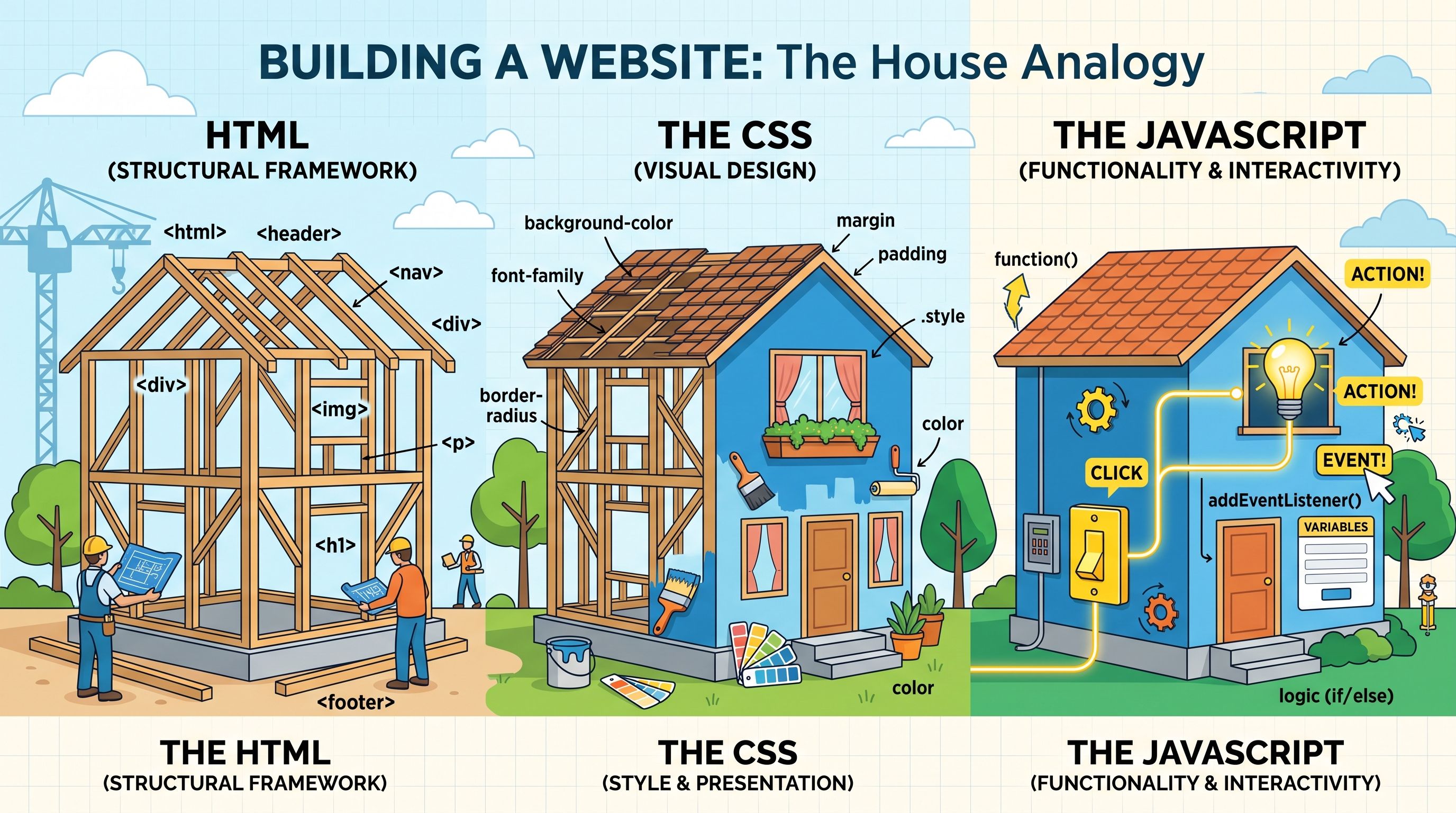
The good news is that once you understand the role each technology plays, everything clicks into place. Think of building a website like constructing a house. HTML is the structure — the walls, doors, and rooms. CSS is the interior design — the paint, furniture, and decorations that make the house look good. JavaScript is what makes things function — the doorbell that rings, the lights that turn on when you flip a switch, the garage door that opens automatically.
In this article, we will break down HTML, CSS, and JavaScript individually, compare their differences side by side, and explain how they work together to create the websites you use every day. Whether you're a complete beginner deciding where to start or someone who wants to solidify your understanding, this guide will give you complete clarity.
How to Use This Guide
- Read the individual explanation of HTML, CSS, and JavaScript first before jumping to the comparison table.
- Try writing a simple HTML file and opening it in your browser to see structure without styling.
- Add a CSS file to the same page and observe how visual styling changes the experience.
- Add a small JavaScript snippet to make an element interactive, like a button click.
- Study the comparison table to understand the core differences at a glance.
- Practice building one small page that combines all three technologies together.
- Explore the FAQs section for quick clarifications on common beginner doubts.
What Is HTML?
HTML stands for HyperText Markup Language. It is not a programming language — it is a markup language, which means its job is to define the structure and content of a webpage. HTML uses "tags" to tell the browser what each piece of content is: a heading, a paragraph, an image, a link, a table, or a form.
For example, a heading is wrapped in <h1> tags, a paragraph is wrapped in <p> tags, and an image is inserted using an <img> tag. Without HTML, a browser would have no idea how to organize or display any content at all. Every single website on the internet, no matter how advanced, starts with HTML at its foundation.
HTML is beginner-friendly because it is not about logic or calculations — it is simply about labeling content correctly. Learning HTML usually takes just a few days for someone completely new to web development.
What Is CSS?
CSS stands for Cascading Style Sheets. While HTML defines what content exists on a page, CSS defines how that content looks. This includes colors, fonts, spacing, layout, alignment, animations, and responsiveness across different screen sizes.
Without CSS, every website would look like plain black text on a white background — functional, but visually unappealing. CSS is what transforms a bare HTML skeleton into a polished, professional-looking website. It allows developers to control everything from the exact shade of a button color to how elements rearrange themselves on a mobile phone versus a desktop screen.
CSS works using "selectors" that target specific HTML elements and "properties" that define how those elements should look. For example, you might select all paragraph tags and set their color to dark gray and their font size to 16 pixels.
What Is JavaScript?
JavaScript is where things get interactive. While HTML and CSS are responsible for structure and appearance, JavaScript is a full programming language that controls behavior. It allows a webpage to respond to user actions — clicking a button, submitting a form, scrolling down a page, or typing into a search bar.
JavaScript can also fetch data from servers without reloading the page, validate form inputs before submission, create animations, build interactive games, and much more. Modern websites rely heavily on JavaScript to feel dynamic and app-like rather than static and flat.
Unlike HTML and CSS, JavaScript involves actual programming logic: variables, loops, conditions, and functions. This makes it slightly more challenging to learn, but it is also what gives websites their "smart" behavior.
HTML vs CSS vs JavaScript: Direct Comparison
| Aspect | HTML | CSS | JavaScript |
|---|---|---|---|
| Purpose | Structure and content | Visual styling and layout | Behavior and interactivity |
| Type | Markup language | Style sheet language | Programming language |
| Learning difficulty | Easiest | Moderate | Hardest of the three |
| Example use | Creating headings, paragraphs, links | Changing colors, fonts, spacing | Handling button clicks, form validation |
| Runs where | Browser interprets tags | Browser applies styles to elements | Browser executes logic/code |
| Can function alone | Yes, but looks plain | No, needs HTML to style | Usually paired with HTML/CSS |
Features
- HTML provides semantic tags that improve accessibility and SEO
- CSS supports responsive design through media queries for different devices
- JavaScript enables real-time interactivity without full page reloads
- HTML forms the backbone that both CSS and JavaScript build upon
- CSS supports animations and transitions for smoother user experiences
- JavaScript can communicate with servers using APIs and fetch requests
- HTML is supported identically across all modern browsers
- CSS frameworks like Bootstrap speed up styling for developers
- JavaScript frameworks like React and Vue extend its capabilities further
- All three technologies are free, open, and maintained by web standards bodies
Benefits of Learning All Three
- Gives you complete control over how a website looks, feels, and functions
- Opens the door to both frontend and full-stack development careers
- Helps you understand how professional websites are actually built
- Makes debugging easier since you understand which layer an issue belongs to
- Improves your ability to customize existing website templates
- Builds a strong foundation before learning frameworks like React or Angular
- Increases your value as a developer since these are non-negotiable basics
- Helps you collaborate better with designers and backend developers
- Enables you to build personal projects and portfolios independently
- Prepares you for more advanced concepts like APIs and databases later
Common Use Cases
- Building a personal portfolio website using HTML and CSS
- Styling a blog to match a specific brand or personal aesthetic
- Creating interactive forms that validate user input with JavaScript
- Building responsive websites that work well on both mobile and desktop
- Adding animations and hover effects to buttons and images
- Creating dropdown menus and navigation bars
- Building single-page applications with dynamic content updates
- Validating email addresses and passwords before form submission
- Creating image sliders and carousels for product showcases
- Building simple browser-based games using JavaScript logic
Frequently Asked Questions
1. Which should I learn first: HTML, CSS, or JavaScript?
Always start with HTML, followed by CSS, and then JavaScript. This order follows the natural structure-style-behavior progression of web development.
2. Can I build a website with only HTML and CSS?
Yes, but it will be static, meaning it won't respond to user interactions like button clicks or dynamic content updates.
3. Is JavaScript the same as Java?
No, despite the similar name, JavaScript and Java are completely different programming languages with different purposes and syntax.
4. How long does it take to learn all three basics?
With consistent practice, most beginners can learn the fundamentals of HTML, CSS, and JavaScript within two to three months.
5. Do I need to memorize all HTML tags and CSS properties?
No, most developers reference documentation regularly. Understanding core concepts matters more than memorization.
6. Is CSS considered a programming language?
No, CSS is a style sheet language, not a programming language, because it does not include logic like loops or conditions.
7. Can JavaScript work without HTML?
JavaScript can run independently in environments like Node.js, but for browser-based websites, it typically works alongside HTML and CSS.
8. What comes after learning HTML, CSS, and JavaScript?
Many developers move on to frameworks and libraries like React, Vue, or Angular for JavaScript, or Sass and Tailwind for CSS.
9. Are HTML, CSS, and JavaScript still relevant with modern frameworks?
Yes, every framework is built on top of these three technologies, so understanding the fundamentals remains essential.
10. Which one is used for backend development?
None of these three are inherently backend technologies, though JavaScript can be used on the backend through Node.js.
How These Three Technologies Work Together
Understanding each technology individually is useful, but the real magic happens when you see how HTML, CSS, and JavaScript work together inside a single webpage. Picture loading a login page: HTML defines the input fields for username and password, along with the submit button. CSS then styles those input fields with rounded corners, a specific color scheme, and proper spacing so the form looks clean and professional. Finally, JavaScript steps in to validate what the user types — checking whether the email format is correct, whether the password meets minimum length requirements, and displaying an error message instantly if something is wrong, all without needing to reload the page.
This layered relationship is often referred to as "separation of concerns." Each technology has a distinct job, which makes code easier to maintain, debug, and scale as a project grows. A developer working on styling doesn't need to touch JavaScript logic, and a developer fixing interactive behavior doesn't need to worry about breaking the page's visual layout. This separation becomes especially valuable in team environments, where different developers might specialize in different layers of a web application.
Modern web development also blurs these lines slightly through frameworks like React, where JavaScript, structure, and even some styling can live together in a single component file. Even so, the underlying principles of HTML for structure, CSS for style, and JavaScript for behavior remain true — frameworks simply organize these concerns differently rather than eliminating the distinction altogether.
Tips for Learning HTML, CSS, and JavaScript Effectively
- Build tiny projects immediately after learning a new concept instead of only watching tutorials
- Use browser developer tools to inspect and experiment with real websites' HTML and CSS
- Practice recreating simple designs from websites you like to strengthen your CSS skills
- Start JavaScript with small, interactive elements like buttons before attempting full applications
- Don't rush into frameworks before you're comfortable with vanilla HTML, CSS, and JavaScript
- Read error messages carefully in the browser console when your JavaScript doesn't work as expected
- Join beginner-friendly web development communities to ask questions and share your progress
Why Choose CodeMaster Academy?
At CodeMaster Academy, every tool and learning resource is completely free forever, with no registration required to get started. All our tools run directly in your browser, meaning nothing needs to be installed, and your data stays secure and private throughout your session. We have optimized our platform to be fast and mobile friendly, so whether you're practicing HTML on a laptop or checking a CSS snippet on your phone, the experience remains smooth. Our commitment to being privacy focused and easy to use makes CodeMaster Academy a reliable companion as you learn and build real web development skills.
Last Updated: July 2026
Conclusion
HTML, CSS, and JavaScript are not competitors — they are teammates that work together to build every website you have ever visited. HTML gives structure, CSS gives style, and JavaScript gives behavior, and understanding this distinction is the first real step toward becoming a capable web developer. Rather than trying to master all three at once, focus on learning them in order and practicing with small projects along the way. Once these fundamentals feel natural, you will be well prepared to explore frameworks, libraries, and more advanced web development concepts with confidence.