 CodeMaster Academy
HTTP vs HTTPS: What's the Difference?
Introduction
Every time you visit a website, your browser communicates with a server using one of two protocols: HTTP or HTTPS. You've likely noticed the small padlock icon next to a website's URL in your browser, or seen "https://" at the beginning of web addresses instead of just "http://" — but have you ever wondered what this actually means and why it matters so much?
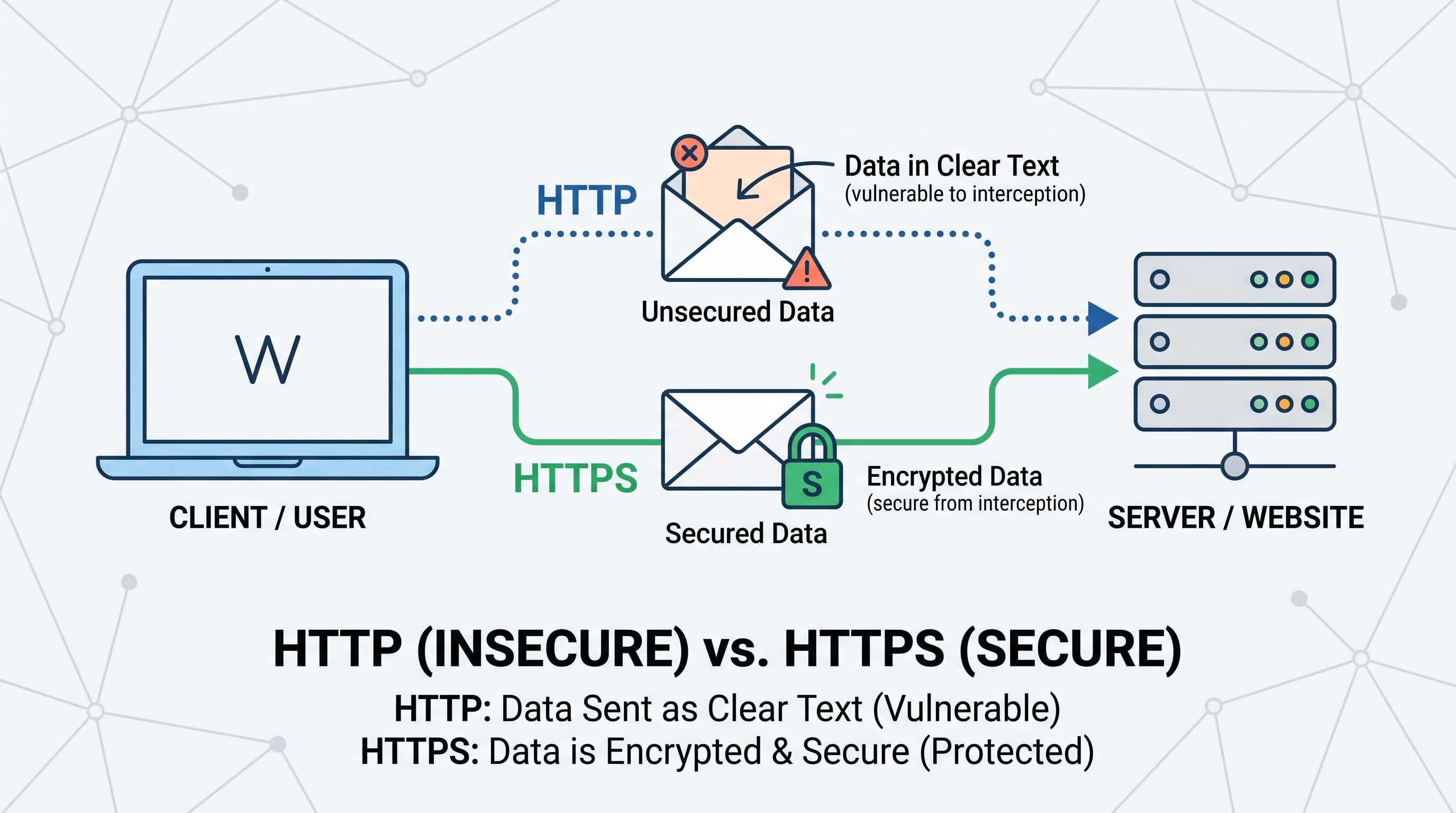
HTTP, which stands for HyperText Transfer Protocol, is the foundational protocol that allows web browsers and servers to communicate and exchange information like web pages, images, and forms. HTTPS, which stands for HyperText Transfer Protocol Secure, is essentially the same protocol but with an added layer of encryption that protects the data being transmitted between your browser and the website's server.
This difference might sound minor, but it has massive implications for online security, privacy, and even how search engines rank websites. In an era where cyberattacks, data breaches, and online scams are increasingly common, understanding HTTP versus HTTPS isn't just technical trivia — it's essential knowledge for anyone who uses the internet, and especially critical for anyone building or maintaining websites.
In this article, we'll explore exactly how HTTP and HTTPS work, why the "S" makes such a significant difference, and what this means for both everyday internet users and web developers.
How to Use This Guide
- Read the "What Is HTTP?" section to understand the basic protocol all websites rely on.
- Read the "What Is HTTPS?" section to understand how encryption changes the picture.
- Review the "How Encryption Works" section for a deeper technical understanding.
- Check the comparison table for a quick summary of key differences.
- Explore the SEO and security implications section if you manage a website.
- Verify whether the websites you frequently use employ HTTPS by checking your browser's address bar.
- If you manage a website still using HTTP, prioritize migrating to HTTPS as soon as possible.
What Is HTTP?
HTTP is the protocol that has powered the web since its early days, defining how requests and responses are formatted and transmitted between a client (your browser) and a server (where the website is hosted). When you type a website address into your browser, an HTTP request is sent to the server, which responds by sending back the requested webpage data.
The major limitation of HTTP is that all data transmitted is sent in plain text, meaning anyone intercepting the connection — whether on a public Wi-Fi network, through a compromised router, or via other malicious means — could potentially read the data being exchanged. This includes sensitive information like login credentials, credit card numbers, or personal messages, making HTTP fundamentally insecure for any website handling sensitive user data.
What Is HTTPS?
HTTPS adds a critical security layer on top of HTTP by encrypting the data transmitted between your browser and the server using a protocol called TLS (Transport Layer Security), formerly known as SSL (Secure Sockets Layer). This encryption scrambles the data in a way that makes it unreadable to anyone intercepting the connection, protecting sensitive information from being exposed.
When you visit a website using HTTPS, your browser and the server perform what's called a "handshake" process, during which they establish a secure, encrypted connection using cryptographic keys. Once this secure connection is established, all data exchanged — including passwords, payment details, and personal messages — is encrypted and significantly more difficult for attackers to intercept and read.
How Encryption Works: A Simplified Explanation
Think of HTTP like sending a postcard through the mail — anyone who handles that postcard along the way, from the mail carrier to anyone who intercepts it, can read exactly what's written on it. HTTPS, by contrast, is like sending that same message in a locked box that only the intended recipient has the key to open. Even if someone intercepts the box during transit, they cannot read its contents without the specific key.
This "key" system in HTTPS relies on what's called public key cryptography, involving a public key (shared openly) and a private key (kept secret by the server). Websites obtain an SSL/TLS certificate from a trusted Certificate Authority, which verifies the website's identity and enables this secure encrypted connection between your browser and their server.
Comparison Table
| Aspect | HTTP | HTTPS |
|---|---|---|
| Security | Data sent in plain text | Data encrypted using TLS/SSL |
| Port used | Port 80 | Port 443 |
| Certificate required | No | Yes, SSL/TLS certificate |
| Browser indicator | No padlock, often marked "Not Secure" | Padlock icon shown in address bar |
| SEO impact | Can negatively affect search rankings | Preferred and often boosted by search engines |
| Data vulnerability | Highly vulnerable to interception | Significantly more protected from interception |
Features
- HTTPS encrypts all data exchanged between browser and server using TLS
- HTTP transmits data in plain, readable text, making it vulnerable to interception
- HTTPS requires a valid SSL/TLS certificate issued by a trusted Certificate Authority
- Modern browsers actively flag HTTP websites as "Not Secure" to warn users
- HTTPS uses port 443 by default, while HTTP uses port 80
- Search engines like Google give ranking preference to HTTPS-enabled websites
- HTTPS protects against man-in-the-middle attacks where data could be intercepted
- Many modern web features, like geolocation, require HTTPS to function
- HTTPS certificates need periodic renewal to remain valid and trusted
- Free SSL certificate options, like Let's Encrypt, have made HTTPS accessible to all websites
Benefits of Using HTTPS
- Protects sensitive user data like passwords and payment information from interception
- Builds trust with visitors through the visible padlock security indicator
- Improves search engine rankings compared to non-secure HTTP websites
- Prevents malicious actors from injecting unwanted content into your website's traffic
- Required for accepting online payments and handling e-commerce transactions securely
- Enables access to modern browser features that require a secure connection
- Protects your website's reputation by avoiding "Not Secure" browser warnings
- Increasingly considered a basic requirement rather than an optional upgrade
Common Use Cases
- Securing login pages where users enter usernames and passwords
- Protecting e-commerce checkout pages that process payment information
- Securing contact forms that collect personal user information
- Protecting healthcare websites that handle sensitive patient data
- Securing banking and financial platforms handling account information
- Protecting government websites that handle citizen data and services
- Securing email login portals to prevent credential theft
- Protecting social media platforms where private messages are exchanged
- Securing cloud storage services where users upload personal files
- Protecting educational platforms that store student records and grades
Frequently Asked Questions
1. Is HTTPS necessary for every website, even simple blogs?
Yes, HTTPS is now considered a baseline requirement for all websites, as it improves both security and search engine ranking, regardless of the website's purpose.
2. How can I tell if a website is using HTTPS?
Look for a padlock icon in your browser's address bar and check that the URL begins with "https://" rather than just "http://".
3. Does HTTPS make a website completely immune to hacking?
No, HTTPS specifically protects data in transit between browser and server, but it doesn't protect against all forms of cyberattacks, like server-side vulnerabilities.
4. Is it expensive to add HTTPS to a website?
Not anymore — free SSL/TLS certificate providers like Let's Encrypt have made HTTPS accessible to virtually every website owner at no cost.
5. Does HTTPS slow down website loading speed?
Modern HTTPS implementations have minimal performance impact, and in many cases, HTTPS can actually improve speed through supporting protocols like HTTP/2.
6. What happens if I enter my password on an HTTP website?
Your password could potentially be intercepted and read by anyone monitoring the network connection, making it a significant security risk.
7. Do search engines really penalize HTTP websites?
Yes, major search engines like Google have confirmed that HTTPS is a ranking factor, and HTTP websites are often flagged with security warnings that discourage visitors.
8. What is an SSL certificate exactly?
An SSL certificate is a digital file issued by a trusted Certificate Authority that verifies a website's identity and enables encrypted HTTPS connections.
9. Can I switch my existing website from HTTP to HTTPS?
Yes, migrating from HTTP to HTTPS involves obtaining an SSL certificate and updating your website's configuration, a process most hosting providers support.
10. Is HTTPS only important for websites that handle payments?
No, HTTPS is important for any website collecting any form of user data, including simple contact forms, login credentials, or even just protecting general browsing privacy.
Migrating a Website from HTTP to HTTPS
If you're managing a website that's still using HTTP, migrating to HTTPS is a relatively straightforward process that offers immediate security and SEO benefits. The first step involves obtaining an SSL/TLS certificate, either through a paid Certificate Authority or a free provider like Let's Encrypt, which has made HTTPS accessible to virtually any website owner regardless of budget. Most modern hosting providers offer simple, often automated, ways to install and renew these certificates without requiring deep technical expertise.
After installing the certificate, you'll need to update your website's configuration to redirect all HTTP traffic to HTTPS automatically, ensuring visitors and search engines consistently access the secure version of your site. It's also important to update any internal links, images, and scripts that might still reference the old HTTP URLs, since mixed content (secure pages loading insecure resources) can trigger browser warnings and undermine the security benefits you're trying to achieve.
Finally, after migrating, it's worth verifying your new HTTPS setup using online SSL testing tools, updating your sitemap and search console settings, and monitoring your search engine rankings over the following weeks, since search engines typically need some time to fully recognize and credit the migration.
Common Misconceptions About HTTPS
Many people mistakenly believe that HTTPS makes a website completely immune to all forms of hacking or attacks, when in reality, it specifically protects data in transit between the browser and server. A website can still be vulnerable to other security issues, like poorly secured databases, weak passwords, or vulnerable server software, even while using HTTPS correctly. Think of HTTPS as one important layer of a broader security strategy, not a complete security solution on its own.
Another common misconception is that HTTPS is only necessary for websites handling payments or highly sensitive data. In reality, any website collecting any form of user data, including simple contact forms, newsletter signups, or even just basic browsing behavior, benefits from the privacy protection HTTPS provides, which is why it has become the expected standard across the entire web, regardless of a website's specific purpose.
Why Choose CodeMaster Academy?
CodeMaster Academy provides free-forever tools with no registration required, all designed to run securely and privately directly in your browser. We take security seriously ourselves, ensuring our platform remains fast, secure, and privacy focused for every learner who visits. Our tools are mobile friendly and easy to use, allowing you to check website security details or format code whether you're at your desk or browsing on your phone. As you learn about important concepts like HTTPS, CodeMaster Academy is committed to practicing the same security principles we teach.
Last Updated: July 2026
Conclusion
The difference between HTTP and HTTPS might seem like a small technical detail, but it represents a fundamental shift in how securely your data travels across the internet. HTTP transmits information in plain, readable text, leaving it vulnerable to interception, while HTTPS encrypts that same data, protecting it from prying eyes through robust cryptographic methods. In today's digital landscape, where cyber threats are increasingly common, HTTPS is no longer optional — it's an essential standard for any website that values user trust, security, and search engine visibility. Whether you're browsing the web or building your own website, understanding and prioritizing HTTPS is a small step that makes a significant difference in online safety.