 CodeMaster Academy
Understanding OOP in Java with Real Examples
Introduction
Object-Oriented Programming, commonly known as OOP, is one of the most important concepts every Java developer must understand. If you've ever felt confused by terms like "class," "object," "inheritance," or "polymorphism," you're not alone — most beginners find OOP intimidating at first because it is often taught using abstract, textbook-style definitions that don't connect to anything real.
This article takes a different approach. Instead of throwing dry definitions at you, we will explain each OOP concept using real, relatable examples that mirror everyday life. By the end, you will not only understand what these terms mean but also why Java, and many other modern languages, are built around this programming style.
Java was designed from the ground up as an object-oriented language, meaning almost everything in Java revolves around classes and objects. This is different from procedural programming, where code is just a sequence of instructions executed top to bottom. OOP instead organizes code around "things" — objects that have properties and can perform actions, much like objects in the real world.
Understanding OOP properly will make you a significantly better Java developer, help you write cleaner and more maintainable code, and prepare you for technical interviews where OOP concepts are almost always tested.
How to Use This Guide
- Read each OOP pillar in order — class and object first, then inheritance, polymorphism, encapsulation, and abstraction.
- Type out the real-world example code for each concept in your own Java IDE.
- Modify the examples slightly to see how behavior changes.
- Try to identify these four pillars in an existing Java project or codebase.
- Practice explaining each concept out loud in your own words — this helps for interviews.
- Build the suggested mini-project at the end of the article to reinforce everything.
- Revisit any pillar that felt confusing after finishing the full article once.
Classes and Objects: The Foundation
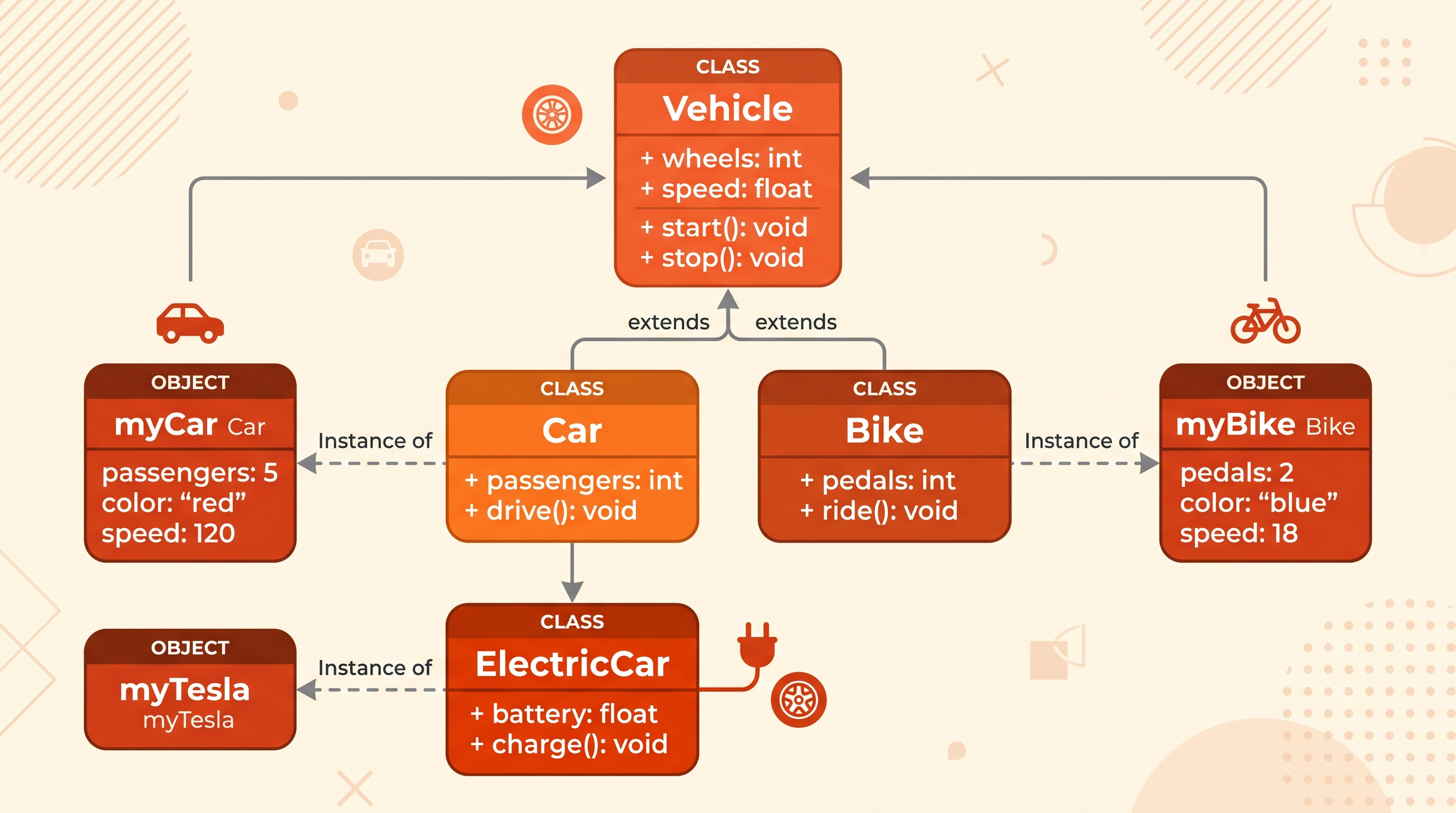
A class is a blueprint, and an object is a real instance created from that blueprint. Think of a class like the blueprint for a car — it defines what a car should have (wheels, engine, color) and what it can do (start, stop, accelerate). An object is an actual car built from that blueprint, like your neighbor's red Honda Civic.
class Car {
    String color;
    String model;

    void startEngine() {
        System.out.println(model + " engine started.");
    }
}

public class Main {
    public static void main(String[] args) {
        Car myCar = new Car();
        myCar.color = "Red";
        myCar.model = "Honda Civic";
        myCar.startEngine();
    }
}
Here, Car is the class (the blueprint), and myCar is the object (an actual instance with real values). You could create multiple car objects — a blue Toyota, a black BMW — all from the same class, each with its own unique data.
Inheritance: Passing Down Traits
Inheritance allows one class to inherit properties and behaviors from another class. This mirrors how children inherit traits from their parents. In Java, the class that inherits is called the "subclass" or "child class," and the class being inherited from is the "superclass" or "parent class."
class Animal {
    void eat() {
        System.out.println("This animal eats food.");
    }
}

class Dog extends Animal {
    void bark() {
        System.out.println("The dog barks.");
    }
}

public class Main {
    public static void main(String[] args) {
        Dog myDog = new Dog();
        myDog.eat();
        myDog.bark();
    }
}
Here, Dog inherits the eat() method from Animal without having to rewrite it. This is exactly like how a puppy is born already knowing how to breathe and eat — traits inherited from being an animal — while also having its own specific dog behaviors like barking.
Inheritance reduces code duplication significantly. If you have ten different animal types, you don't need to write the eat() method ten times — you write it once in the parent class and every child class automatically gets access to it.
Polymorphism: One Action, Many Forms
Polymorphism means "many forms." In real life, think about the word "drive." You drive a car, you drive a motorcycle, and you drive a truck — the action "drive" looks different depending on the vehicle, but the concept remains the same. In Java, polymorphism allows a single method name to behave differently depending on the object calling it.
class Animal {
    void makeSound() {
        System.out.println("Animal makes a sound.");
    }
}

class Cat extends Animal {
    void makeSound() {
        System.out.println("Cat meows.");
    }
}

class Cow extends Animal {
    void makeSound() {
        System.out.println("Cow moos.");
    }
}

public class Main {
    public static void main(String[] args) {
        Animal myAnimal;

        myAnimal = new Cat();
        myAnimal.makeSound();

        myAnimal = new Cow();
        myAnimal.makeSound();
    }
}
Even though both Cat and Cow use the same makeSound() method name, each produces different behavior. This is called method overriding, one of the two main types of polymorphism in Java (the other being method overloading, where multiple methods share a name but differ in parameters).
Encapsulation: Protecting Your Data
Encapsulation is about bundling data and the methods that operate on that data into a single unit, while restricting direct access to some of an object's components. Think of it like a medicine capsule — the ingredients are hidden inside a protective shell, and you interact with the capsule as a whole rather than accessing the raw ingredients directly.
class BankAccount {
    private double balance;

    public void deposit(double amount) {
        if (amount > 0) {
            balance += amount;
        }
    }

    public double getBalance() {
        return balance;
    }
}

public class Main {
    public static void main(String[] args) {
        BankAccount account = new BankAccount();
        account.deposit(500);
        System.out.println("Balance: " + account.getBalance());
    }
}
Here, the balance variable is marked private, meaning it cannot be accessed directly from outside the class. Instead, you must use the deposit() and getBalance() methods, which control exactly how the balance can be changed or viewed. This prevents someone from accidentally (or intentionally) setting a negative balance directly, protecting the integrity of the data.
Abstraction: Hiding Complexity
Abstraction means hiding complex implementation details and showing only the essential features to the user. Think about driving a car — you press the accelerator to speed up without needing to understand the complex combustion process happening inside the engine. Java achieves abstraction through abstract classes and interfaces.
abstract class Shape {
    abstract double calculateArea();
}

class Circle extends Shape {
    double radius = 5;

    double calculateArea() {
        return Math.PI * radius * radius;
    }
}

public class Main {
    public static void main(String[] args) {
        Circle myCircle = new Circle();
        System.out.println("Area: " + myCircle.calculateArea());
    }
}
The Shape class defines that every shape must have a calculateArea() method, without specifying how each shape calculates it. Each subclass, like Circle, provides its own implementation. This lets you work with the general concept of a "shape" without worrying about the specific formula used for each type.
Features of Java's OOP Model
- Supports all four core OOP pillars: inheritance, polymorphism, encapsulation, and abstraction
- Allows code reuse through class inheritance, reducing duplication
- Provides access modifiers (private, public, protected) for controlled data access
- Supports both abstract classes and interfaces for flexible design
- Enables method overloading and overriding for flexible behavior
- Encourages modular code organization through well-defined classes
- Supports constructors for initializing objects with specific starting values
- Allows composition, where classes can contain objects of other classes
- Provides strong type-checking at compile time, reducing runtime errors
- Widely supported across enterprise applications, Android development, and backend systems
Benefits of Learning OOP in Java
- Makes large codebases easier to organize, maintain, and scale
- Encourages code reuse, saving development time on future projects
- Improves collaboration since classes represent clear, understandable units
- Makes debugging easier since issues can be isolated to specific classes
- Prepares you for technical interviews, where OOP questions are extremely common
- Builds a strong foundation for learning design patterns later
- Helps you understand frameworks like Spring, which rely heavily on OOP principles
- Improves code security through encapsulation and controlled data access
- Makes it easier to extend functionality without rewriting existing code
- Mirrors real-world thinking, making complex systems easier to model
Common Use Cases
- Building enterprise applications with clearly separated business logic
- Developing Android applications, which are built entirely using Java OOP principles
- Creating banking systems where encapsulation protects sensitive account data
- Building inventory management systems using inheritance for product categories
- Designing game characters with shared behaviors through parent classes
- Creating employee management systems with different roles inheriting a base Employee class
- Building e-commerce platforms with polymorphic payment processing methods
- Structuring hospital management systems with patients, doctors, and staff as separate classes
- Developing library systems with Book, Member, and Librarian classes
- Creating school management software using abstraction for different user types
Frequently Asked Questions
1. What are the four pillars of OOP?
The four pillars are inheritance, polymorphism, encapsulation, and abstraction, and Java supports all four natively.
2. What is the difference between a class and an object?
A class is a blueprint or template, while an object is an actual instance created from that blueprint with real data.
3. Can a Java class inherit from multiple classes?
No, Java does not support multiple inheritance through classes, but it does support it through interfaces.
4. What is the difference between method overloading and overriding?
Overloading means multiple methods share a name but differ in parameters within the same class, while overriding means a subclass provides its own version of a parent class's method.
5. Why is encapsulation important?
Encapsulation protects data from unauthorized or accidental modification by restricting direct access and forcing interaction through controlled methods.
6. What is an abstract class in Java?
An abstract class is a class that cannot be instantiated directly and may contain abstract methods that subclasses must implement.
7. Is Java a purely object-oriented language?
Not entirely, since Java also uses primitive data types like int and boolean that are not objects, but it is heavily object-oriented overall.
8. What is the difference between an interface and an abstract class?
An interface only defines method signatures without implementation (with some exceptions), while an abstract class can contain both abstract and fully implemented methods.
9. Do I need to master OOP before learning Java frameworks like Spring?
Yes, a solid understanding of OOP is essential because frameworks like Spring are built entirely around object-oriented design principles.
10. How can I practice OOP concepts effectively?
Build small real-world projects like a library system, banking app, or employee management tool, since these naturally require you to apply all four OOP pillars.
Why Choose CodeMaster Academy?
CodeMaster Academy is designed to support your Java learning journey with tools that are free forever and require no registration to use. Every tool runs directly in your browser, making it fast, secure, and privacy focused, since none of your code or data is stored on our servers. Whether you're practicing OOP concepts on a desktop at home or reviewing Java syntax on your phone during a commute, our platform remains mobile friendly and easy to use throughout. We built CodeMaster Academy to remove barriers for learners like you, so you can focus entirely on mastering concepts like OOP without worrying about complicated setups or hidden costs.
Last Updated: July 2026
Conclusion
Object-Oriented Programming can feel abstract when explained through textbook definitions alone, but once you connect each concept to real-world examples, it becomes much easier to understand and apply. Classes and objects, inheritance, polymorphism, encapsulation, and abstraction are not just academic terms — they are practical tools that help you write cleaner, more organized, and more maintainable Java code. As you continue building projects, try to consciously identify and apply these four pillars, since doing so will strengthen both your coding skills and your ability to explain these concepts confidently in interviews and real development work.